









MetaMask is one of the most popular cryptocurrency wallets, widely used to store, send, and receive Ethereum-based assets and interact with decentralized applications (dApps) on the Ethereum blockchain. Initially launched as a browser extension, MetaMask now supports both desktop and mobile platforms, making it versatile and easy to access.
Overview
MetaMask is a hot wallet, meaning it is connected to the internet, but its security features and ease of use make it highly popular among crypto enthusiasts. MetaMask is not only a wallet but also acts as a bridge to the world of decentralized finance (DeFi), enabling users to interact with dApps like Uniswap, OpenSea, and decentralized exchanges (DEXs).
Here’s a step-by-step tutorial to help beginners set up and use MetaMask for the first time.
Key Features
- User-Friendly Interface
MetaMask is designed with simplicity in mind, allowing users to easily store and manage Ethereum (ETH) and Ethereum-based tokens (ERC-20 and ERC-721 NFTs). Its interface is intuitive, making it beginner-friendly, yet robust enough for experienced users. - DeFi and dApp Access
One of MetaMask’s most significant features is its ability to connect users with dApps and DeFi platforms, where they can trade, lend, borrow, and swap assets directly from their wallets. MetaMask supports integration with platforms like Uniswap, Compound, and Aave. - Custom Networks and Tokens
MetaMask supports more than just Ethereum. You can add other networks like Binance Smart Chain (BSC) or Polygon, allowing you to interact with a wider array of assets and decentralized services.
Getting Started with MetaMask
Follow this step-by-step guide to set up your MetaMask wallet and begin your crypto journey.
Step 1: Installation
MetaMask is available as a browser extension for Chrome, Firefox, Brave, and Edge, as well as a mobile app for Android and iOS. To install it on your browser:
- Visit the official MetaMask website.
- Click on “Download” and choose the appropriate browser extension or mobile version.
- Once installed, click the MetaMask icon to launch it.
Step 2: Create a New Wallet
After launching MetaMask, you’ll be prompted to either create a new wallet or import an existing one using a recovery phrase. For beginners, select “Create a New Wallet.”
- You’ll need to create a strong password. This protects access to your wallet on the device you’re using.
- MetaMask will then generate a Secret Recovery Phrase — 12 random words that serve as your wallet’s backup. Write this phrase down and store it safely, as it’s the only way to recover your wallet if your device is lost or compromised.
Step 3: Add Assets
MetaMask automatically supports Ethereum (ETH), but you can add additional tokens by following these steps:
- Click on “Assets” and then “Add Token.”
- Search for the token you want to add, or enter its contract address if it’s not listed.
- Once added, your assets will be visible under the “Assets” tab.
Step 4: Send and Receive Cryptocurrency
- To receive assets, click “Receive,” then copy your wallet address (a long string of characters starting with 0x). You can share this address with anyone who wants to send you cryptocurrency.
- To send assets, click “Send,” enter the recipient’s wallet address, specify the amount, and confirm the transaction. Always double-check the address to avoid mistakes.
Step 5: Interact with dApps
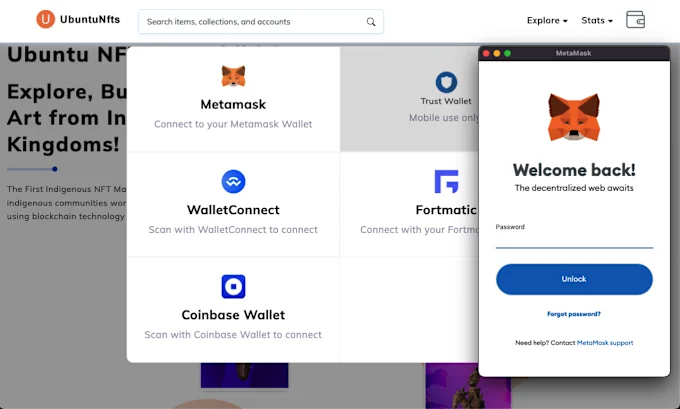
One of MetaMask’s key benefits is the ability to interact with decentralized applications. To do this:
- Visit a dApp’s website (e.g., Uniswap, OpenSea).
- The site will prompt you to connect your MetaMask wallet. Approve the connection, and you can begin trading or interacting with the dApp.
Security Tips
- Backup Your Seed Phrase
Your seed phrase is your lifeline to accessing your wallet. Never share it with anyone and store it offline in a secure location. - Beware of Phishing Attacks
Since MetaMask is a hot wallet, it is vulnerable to phishing attacks. Always ensure you are on the correct website before entering your credentials, and never click on suspicious links. - Use Hardware Wallets for Large Balances
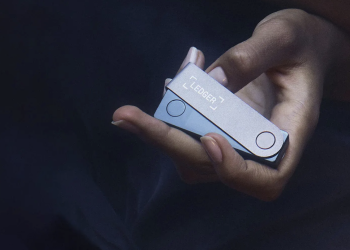
If you plan to store large amounts of cryptocurrency, consider integrating MetaMask with a hardware wallet like Ledger for an added layer of security.
PROS:
- User-friendly: Easy for beginners to install and use.
- DeFi access: Seamlessly connects with decentralized applications.
- Custom network support: Add other blockchains like Binance Smart Chain.
CONS:
- Hot wallet: It’s always online, so it’s more vulnerable to hacking than cold storage.
- Gas fees: Transactions can be expensive during network congestion on Ethereum.
Conclusion
MetaMask is a highly versatile wallet that strikes the perfect balance between usability and functionality. Its user-friendly design, combined with seamless integration with DeFi and dApps, makes it an excellent choice for beginners venturing into the world of cryptocurrency. While it is secure for daily use, be mindful of phishing risks and consider extra layers of protection for larger investments.
The opinions shared in this article are those of the author and do not necessarily reflect the stance of CryptoHubDaily. The content is intended solely for educational and informational purposes and should not be interpreted as financial or investment advice. CryptoHubDaily is not liable for any investment choices made based on the information presented in this article.